

A good computer has long since stopped being the only thing you need to work effectively. After a few hours in front of a screen, it is often the little things that start to make a difference. Technology manufacturers have clearly taken notice, flooding the workplace market in recent years with gadgets that promise to make us more efficient, focused and even more comfortable.
Some really do manage to improve the workday. Others are mainly expensive solutions to problems that may not have existed in the first place. We tested several products vying for a permanent place on our desks to find out which are worth spending money on and which you can do without.
PLAUD AI Pro: AI-powered meeting transcription and summaries
The PLAUD AI Pro is designed for users who need fast, accurate documentation of conversations, meetings and interviews. The device features a slim aluminum-alloy body resembling a thick credit card, allowing it to attach magnetically to the back of a smartphone or slip into a shirt pocket without creating a noticeable bulge. The build quality is meticulous and feels durable, while the physical switch for toggling between room recording and direct phone-call recording is conveniently positioned to prevent accidental activation.
On the technical side, the device combines a dual-microphone array with a built-in bone-conduction sensor designed to capture sound vibrations directly from the phone without relying on its external speaker. Recordings are quickly synchronized via Bluetooth with a dedicated app, which sends the data to the cloud for processing by large language models to produce full transcripts and structured meeting summaries.
In practical testing, transcription accuracy was very high for conversations in English and moderate to reasonable for multilingual conversations involving several speakers. Battery life provides nearly 30 hours of continuous recording. The device's main drawback is its accompanying business model: Full access to advanced transcription features and summary generation requires a paid monthly subscription once the initial allowance, currently about 300 minutes, is used up.
For professionals, journalists and executives who hold multiple meetings every day, it is clearly a time-saving tool that can justify its price of about NIS 650 ($215) for the device itself, excluding the subscription. Compared with traditional recorders that lack an AI processing layer, it offers a clear advantage but also requires an ongoing financial commitment.
It is important to keep in mind, however, that it does not do anything your smartphone's built-in recorder cannot also do. Many models today offer transcription and audio-processing capabilities that do not require dedicated hardware. Still, the ability to separate the smartphone from the physical recording device can be very useful in certain situations, such as lectures in a large university auditorium or when you want to record without using your smartphone.
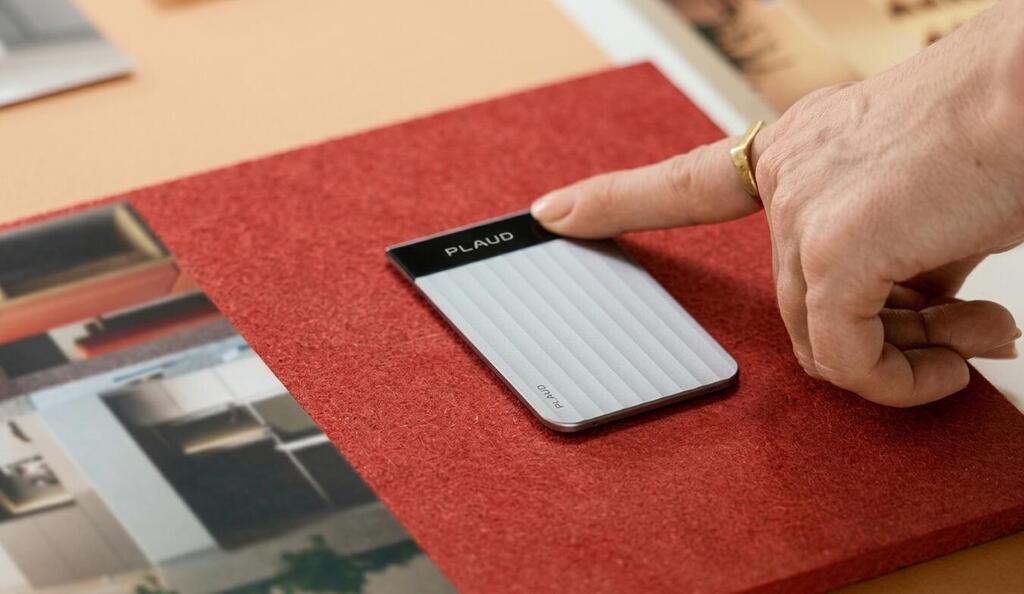
PLAUD AI Pro
(Photo: PLAUD)
Logitech Signature Comfort Combo MK880 keyboard and mouse
The Logitech Signature Comfort Combo MK880 keyboard and mouse set is aimed at office users who spend long hours in front of a screen and want greater comfort without switching to an overly complex split-keyboard design. The keyboard features a soft built-in wrist rest and an adjustable tilt, while the mouse has pronounced curves designed to accommodate a natural grip. The plastic materials have a high-quality matte finish, although the keyboard takes up a considerable amount of desk space because it includes a numeric keypad.
The keyboard offers relatively deep key travel with quiet, precise feedback that helps reduce typing errors. The mouse features the company's SmartWheel, which automatically switches between precise line-by-line scrolling and fast scrolling through long documents, along with quiet-click switches that reduce background noise in open-plan offices. Both devices connect via a Logi Bolt dongle or Bluetooth and, as is common with the manufacturer's products, allow users to quickly switch among three devices at the touch of a button.
The main compromise with this model is the lack of backlit keys, making it more difficult to work in low-light conditions. In addition, its reliance on standard AA and AAA batteries rather than rechargeable lithium batteries with USB-C charging may deter users who prefer to avoid disposable batteries, although the stated battery life is measured in many months.
At about NIS 390 ($130), this is one of the better-value packages for users seeking a reliable, consistent ergonomic solution for a home office. It offers a considerably better compromise than cheap entry-level products without reaching the premium prices of the manufacturer's MX series.
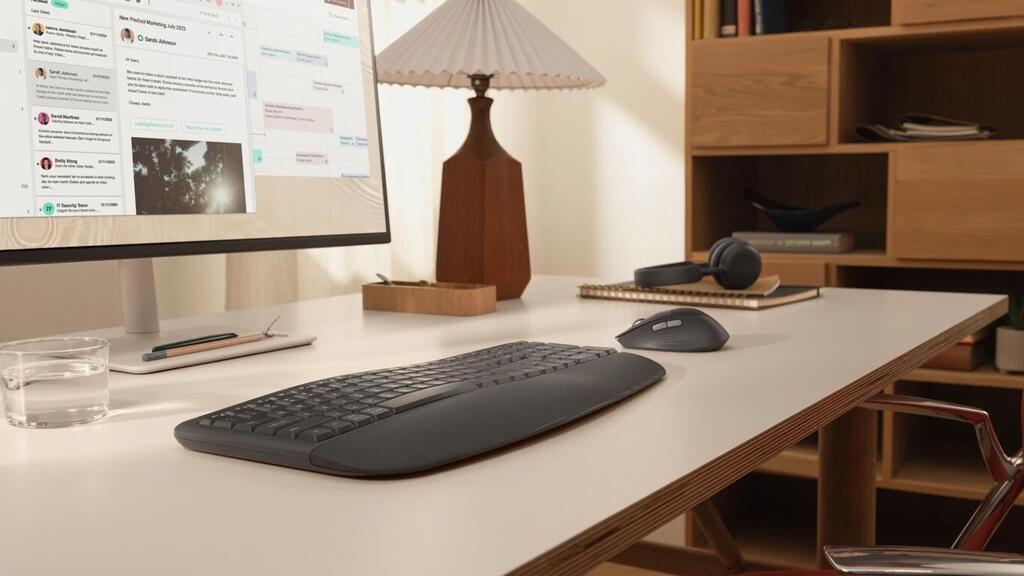
Logitech Signature Comfort Combo MK880 keyboard and mouse
(Photo: Logitech)
SanDisk Extreme Fit USB-C Flash Drive
The 256GB SanDisk Extreme Fit provides a solution for users looking to quickly expand the storage capacity of modern laptops equipped only with USB-C ports. Its exterior is exceptionally small, roughly the size of a tiny mouse receiver, allowing it to remain permanently connected to a laptop without much concern about damage or breakage when the computer is placed in a bag. The drive combines a hard plastic body with a snug metal connector that sits securely in the port.
In terms of performance, the drive supports USB 3.2 Gen 1 and delivers sequential read speeds of up to 400 MB per second, allowing large document files and videos to be opened without noticeable delays. However, it is not intended for continuously working on files in real time, but rather for storing finished work. Everyday data transfers run smoothly, and the drive is immediately recognized by Windows and macOS computers as well as Android devices that support OTG.
The most notable drawback stemming from its tiny dimensions is rapid and noticeable heat buildup. During prolonged write operations involving files totaling tens of gigabytes, the thermal protection mechanism kicks in and write speeds fall dramatically to prevent damage to the memory components.
Its small size also makes it very easy to lose if it is not left permanently connected to a device. The drive is particularly well suited to anyone who needs passive storage expansion for a laptop or tablet to hold media libraries and documents, and it costs about NIS 250 ($85). For continuous, heavy backup tasks, a dedicated external SSD is preferable, but when it comes to sheer portability, SanDisk's tiny drive is difficult to beat.
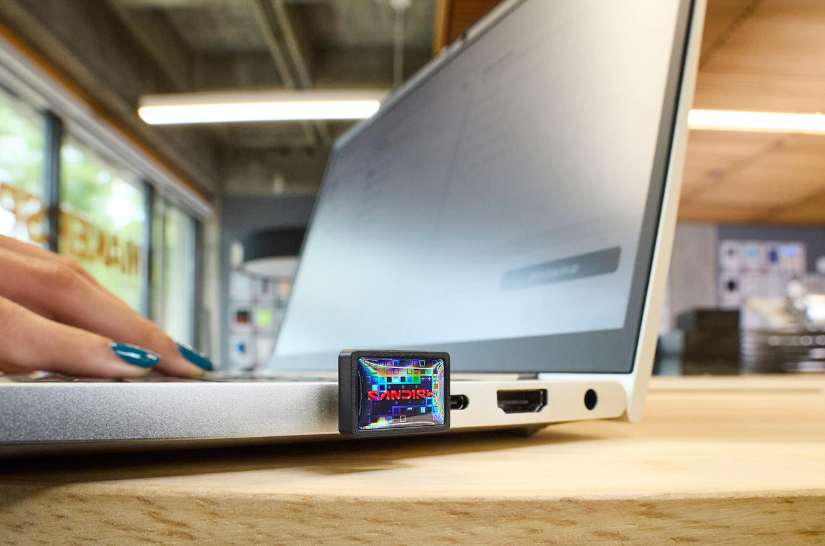
SanDisk Extreme Fit USB-C Flash Drive
(Photo: SanDisk)
Govee smart lighting
Lighting may not be the first thing that comes to mind when upgrading a workspace, but Govee's two lamps aim to make it a more active part of the environment. The Table Lamp 2 Pro x Sound by JBL is a desk lamp that combines RGBICWW lighting with a speaker developed in collaboration with JBL, while the H60B0 Uplighter Floor Lamp is a 1.7-meter (5.6-foot) floor lamp that divides its lighting into three distinct zones. Both connect to the Govee Home app, support Matter and allow users to control the lighting with voice commands.
Of the two, the Uplighter is better suited to users who want to illuminate an entire workspace rather than just a desk, and its price is similar to that of conventional high-quality floor lamps at NIS 599 ($200). It combines white lighting in the lower section, colored ambient lighting in the center and an upper section that projects a dynamic wave effect onto the wall. This allows it to serve as practical lighting during the workday before becoming ambient lighting in the evening.
The Table Lamp 2 Pro is a somewhat different creature, and it is also more expensive at NIS 699 ($230). It features 210 individually controlled LEDs, more than 100 lighting scenes and 16 modes that synchronize the lighting with music, along with a built-in JBL speaker. It also has an internal battery, allowing it to be unplugged and moved from place to place.
The biggest advantage of both lamps is their flexibility. You do not have to turn your office into an RGB party to enjoy them, and the smart lighting can be used to adjust the atmosphere according to the time of day and type of work. On the other hand, anyone simply looking for a lamp that adequately illuminates a desk can get that basic function from a much simpler and cheaper product.
Much of the value here lies in the effects, the app and integration with smart-home systems, as well as the Table Lamp's built-in speaker. These products are therefore more of an upgrade for a carefully designed workspace than essential equipment that will change the way you work on its own.
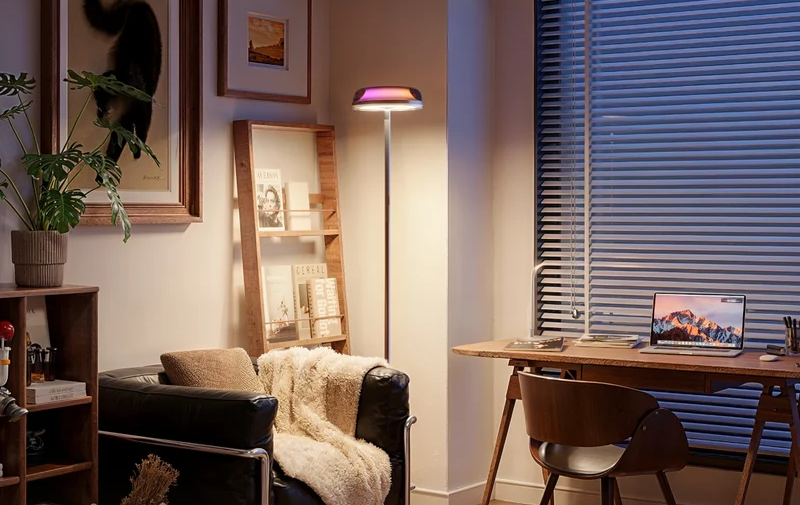
Smart floor lamp
(Photo: Govee)
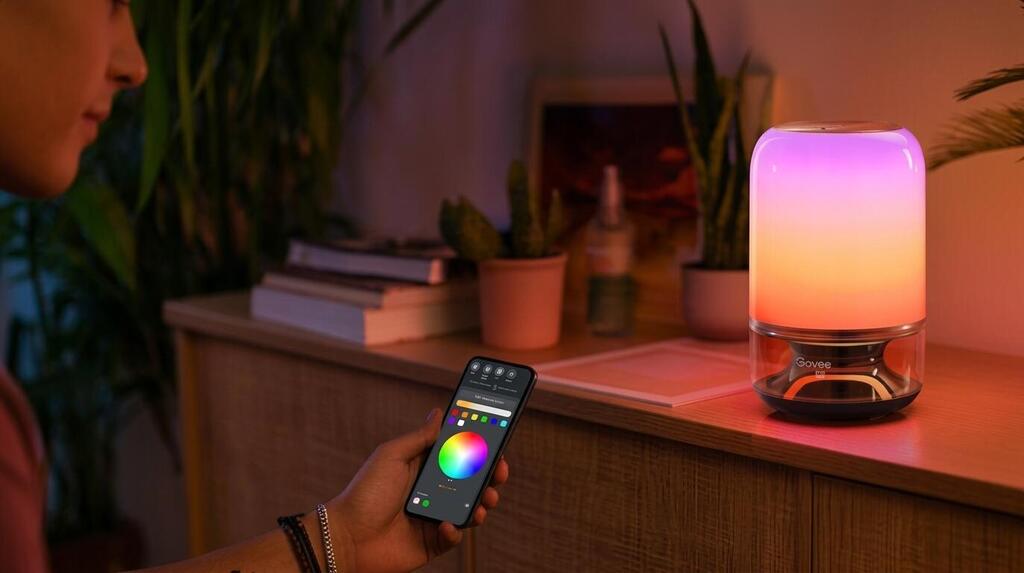
Govee Table Lamp 2 Pro JBL smart desk lamp with integrated speaker
(Photo: Govee)
Logitech Spotlight 2 presentation remote
The Logitech Spotlight 2 presentation remote continues the minimalist, technology-focused approach of its predecessor and is intended for lecturers and sales professionals who need to deliver complex presentations. The remote is made from a high-quality, rounded aluminum body with balanced weight that sits comfortably in the hand. Its button layout has been reduced to just three controls, allowing it to be operated by touch while speaking without having to look down at the device.
Instead of a traditional optical laser beam, which cannot be seen on TV screens and LED displays, the device uses an advanced motion-sensor system that communicates directly with the computer screen. The accompanying software allows users to highlight specific areas, magnify details on the screen or activate links and videos at the touch of a button from up to 30 meters (98 feet) away. The remote also includes an internal vibration motor with haptic feedback that alerts presenters when they reach preset time markers.
Its complete dependence on software is the device's main weakness. Connecting the remote to a computer without administrator privileges to install Logitech's application turns it into a very basic slide remote and eliminates its digital magnification and highlighting capabilities. The lack of a small display for directly monitoring the time also means users must rely entirely on vibration alerts.
At around NIS 500 ($165), it is an expensive tool compared with simple laser remotes and is aimed primarily at professional lecturers and executives who regularly present on modern displays. For users who only need to advance slides, it is an unnecessary expense. For professional presenters, however, it solves the visibility problem associated with presentations on large screens.
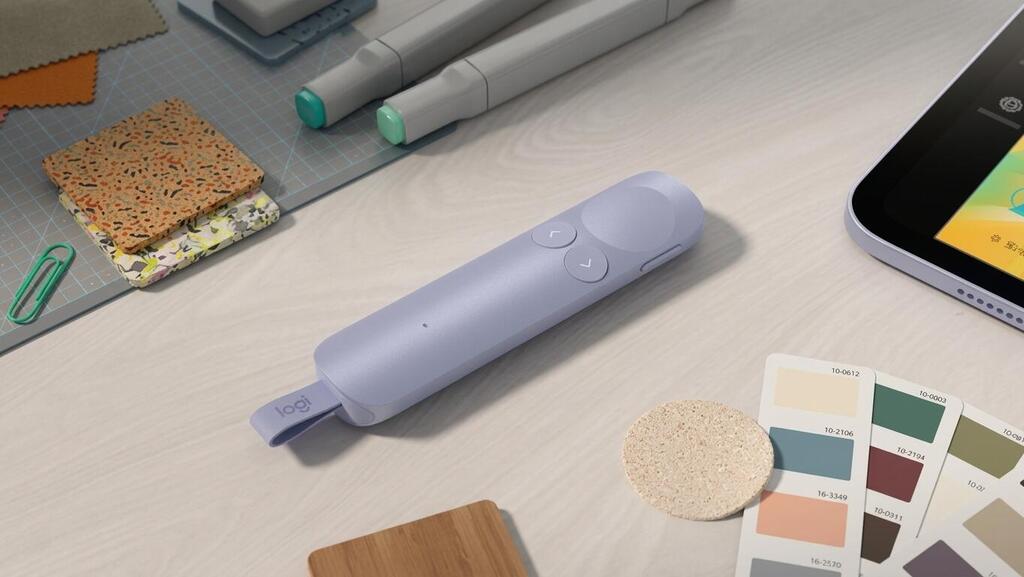
Logitech Spotlight 2 presentation remote
(Photo: Logitech)
Jabra Evolve3 75 professional office headphones
The Jabra Evolve3 75 sits at the high end of the professional office-headphone category and is designed to bridge the gap between noisy work environments and conference calls that require clear audio. The on-ear design features a headband padded with synthetic leather and dual-layer foam ear cushions that distribute pressure effectively across the ears. The construction feels sturdy and durable, while the built-in microphone boom can be fully concealed inside the earcup when not in use.
On the technology side, the headphones feature an array of microphones and an AI algorithm that, according to the manufacturer, was trained on about 60 million sentences. It isolates the speaker's voice and filters out ambient background noise impressively, even in busy open-plan offices. Active noise cancellation can be adjusted in stages, while 40mm drivers provide excellent sound quality not only for calls but also for listening to music. Dual connectivity allows the headphones to connect simultaneously to a computer via a dedicated adapter and to a smartphone, automatically switching when a call comes in. Battery life is rated at about 24 hours of talk time.
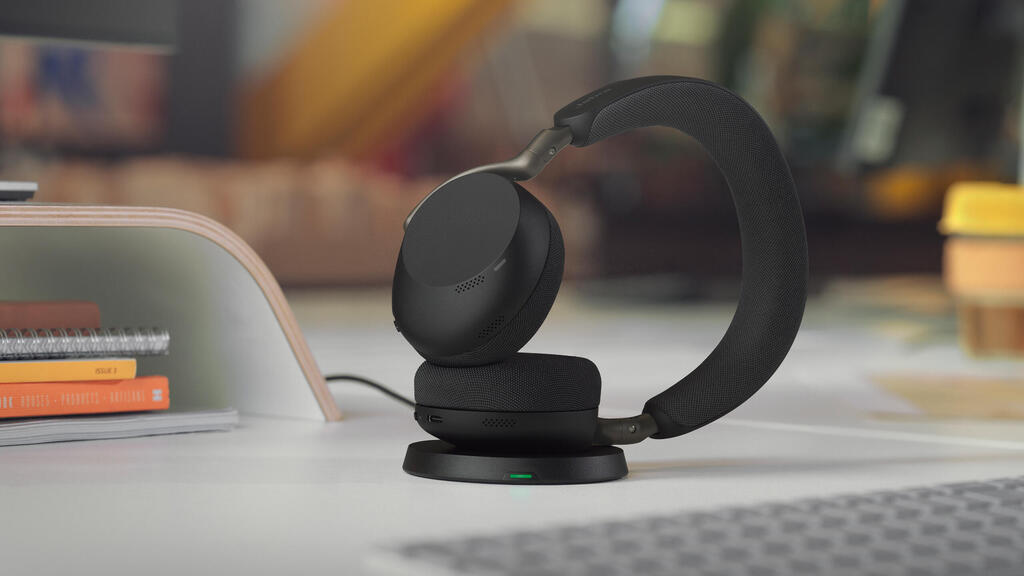
Jabra Evolve3 75 professional office headphones
(Photo: Jabra)
The on-ear design, rather than one that surrounds the ears, creates noticeable pressure after several hours of continuous use, particularly for people who wear glasses. Even so, the headphones remain very comfortable to use. Their high price, however, puts them above many consumer headphones that offer similar noise-canceling performance, though without the same microphone quality and office-oriented connection stability.
With a price tag of about NIS 1,350 ($450), the headphones are intended for people who spend many hours each day on video and phone calls and need reliable noise filtering on both sides of the conversation. For occasional use, they are a significant expense, but as a primary work device, they are among the most comprehensive professional solutions on the market.