

Planning a vacation usually begins with dozens of open tabs: flights, hotels, restaurants, attractions, weather forecasts and a map that is somehow supposed to turn all of them into a sensible itinerary.
Artificial intelligence promises to reduce much of that work to a conversation. Tell a chatbot where you want to go, when you are traveling, who is coming and how much you want to spend, and it can suggest destinations, compare options and even build a day-by-day plan.
Gallery

From cheap flights to daily itineraries: How Google wants AI to plan your next trip
(Photo: Max Acronym / Shutterstock)
Google recently published a guide to planning vacations with Gemini as it promotes a growing collection of AI-powered travel tools. The company says interest in AI trip-planning tools has risen sharply.
Google, of course, is far from alone. ChatGPT can help research destinations and build itineraries, KAYAK offers natural-language travel searches, Mindtrip and Layla focus on trip planning, Wanderlog is designed in part for collaborative itineraries, and Perplexity can be useful for checking information against current online sources.
Here, however, the focus is on Google’s expanding travel ecosystem and how its tools can be used before departure and during the trip itself.
Step 1: Start dreaming. Where should you go, and when?
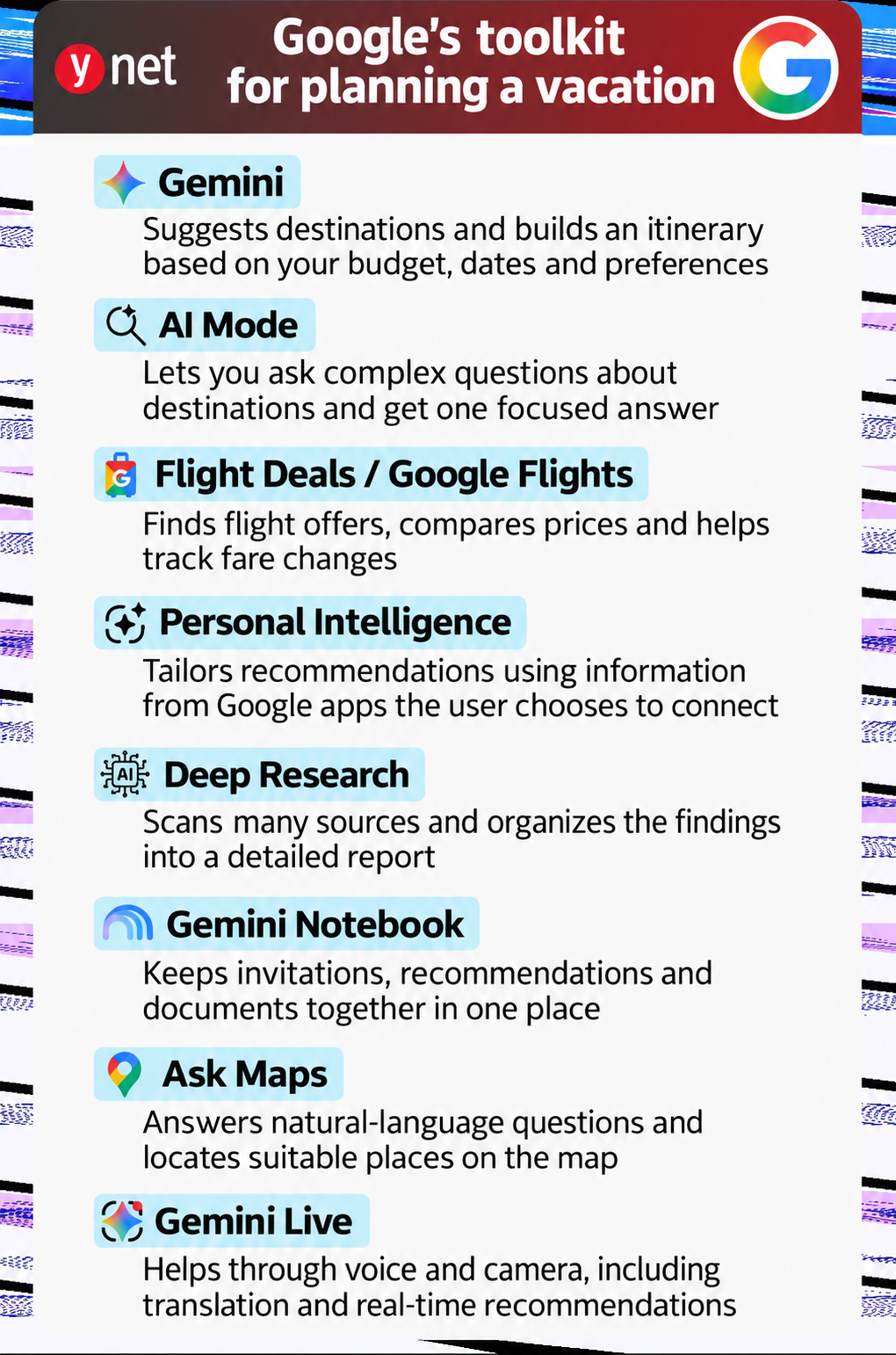
Tools: Gemini and AI Mode in Google Search
Instead of beginning with a list of destinations, travelers can start by describing the vacation they want.
Someone looking for a romantic four-night getaway in November, for example, could specify a maximum flight time, budget, preferred weather, food scene and hotel location, then ask Gemini to compare several destinations.
A useful prompt could be: “Suggest three destinations for a four-night vacation in November, no more than a four-hour direct flight from Tel Aviv. I want pleasant weather, good food and a centrally located hotel. Compare the advantages, disadvantages and estimated cost.”
The more detail included in the request, the more targeted the answer can become. Dates, budget, number and ages of travelers, accessibility requirements, dietary preferences and desired pace can all help.
Travelers can then refine the results, eliminating rainy destinations, adding child-friendly options or comparing a city break with a nature-focused vacation.
As with any AI-generated answer, however, flight schedules, prices and availability should be treated as a starting point rather than definitive booking information. Important details should be checked against airlines, hotels and other official sources.
Step 2: Get down to numbers. How do you find a good flight deal?
Tools: Flight Deals and Google Flights price tracking
Once the destination search narrows, the next challenge is airfare.
Flight Deals, an experimental feature within Google Flights, lets users describe the kind of trip they want instead of entering a specific destination and fixed dates.

Six ways AI can help plan your next vacation, from flight deals to real-time advice
(Photo: Ultraskrip / shutterstock)
A traveler might search for “a cheap beach vacation in November with no stops” or “a European city with great food for a long weekend.”
Google then interprets the request and searches its flight inventory for matching destinations, dates and fares.
Google says Flight Deals labels a fare as a “Savings Deal” when it is at least 20% below the typical price for a comparable trip. Its benchmark is based on the median of the cheapest fares found over the previous 12 months, taking into account factors including season, trip length and cabin class.
Once a suitable option appears, travelers can activate Google Flights price tracking and receive alerts when fares change.
Flight Deals remains experimental, so its suggestions may not always perfectly match the request. And the headline fare is only part of the cost: baggage rules, cancellation policies and change fees should also be checked before booking.
Step 3: Fill the days. What is actually worth doing?
Tools: Deep Research, Ask Maps, YouTube and Gemini in Chrome
Once the destination and flights are set, the real planning begins: deciding what is worth visiting, what needs to be booked in advance and how to put everything together without spending half the day crossing the city.
Gemini’s Deep Research feature can search widely across the web and organize its findings into a report with links to sources.
Instead of asking something broad like “What should I do in Paris?” users can be much more precise: “Find vintage markets in Paris that are open this weekend. Group them by neighborhood and include opening hours, the nearest Metro station and what makes each one worth visiting.”
Ask Maps brings a similar conversational approach into Google Maps. Instead of separately looking for a restaurant, parking and nearby attractions, users can ask for a place that satisfies several conditions at once and continue refining the results conversationally.
Gemini integrations in YouTube and Chrome can also help when research is scattered across long videos and multiple webpages. A traveler can ask about a specific detail in a lengthy video or seek assistance based on the webpage currently open in Chrome.
Step 4: Make the itinerary personal
Tool: Personal Intelligence in Gemini
A generic itinerary is only a starting point.
A family with young children, a vegan couple and a traveler who prefers museums to shopping may need completely different plans for the same city.
Google’s Personal Intelligence features allow Gemini, with the user’s permission, to draw on selected information from connected Google services such as Gmail, Calendar, YouTube and Photos.
That means recommendations can be based not only on the current prompt but also on reservations, saved places and interests already associated with the account.
A traveler might ask: “Plan my upcoming weekend in Copenhagen. Use the places I have saved, the hotel reservation in my Gmail and my interests to suggest an itinerary.”
The advantage is convenience: users do not have to copy every booking and preference into the conversation manually.
The connection is not automatic. Users choose which services to connect and can disconnect them later, while availability can differ by account, region and rollout stage.
Google says Gemini can combine real-time information from services including Maps, Flights and Hotels with connected personal data to create more customized travel plans.
Step 5: Put the entire vacation in one place
Tool: Gemini Notebook
Flight confirmations are in email, hotel links are buried in a family chat and restaurant recommendations are sitting in screenshots. As departure approaches, simply remembering where everything is stored becomes a task of its own.
In July, Google renamed NotebookLM as Gemini Notebook. The product remains available as a standalone research tool while becoming more closely integrated with the wider Gemini ecosystem.
Travelers can create a notebook specifically for a trip and add documents, webpages, YouTube videos and other source material.
They can then ask questions based on those sources, such as: “Create a table of all the flights, hotels and activities we have booked,” “Which evenings still have nothing planned?” or “Which of the restaurants we saved is closest to the hotel?”
The main advantage is that the notebook can serve as a centralized digital trip file built around the material the traveler has deliberately added.
Step 6: The trip begins, but the AI keeps working
Tools: Gemini Spark, Gemini Live and image tools
Even a carefully planned itinerary can fall apart because of rain, public transport disruptions or an attraction closing unexpectedly.
Gemini Spark is designed for longer-running tasks that can continue after the user closes the chat.
A traveler could, for example, ask it to check the weather during a Paris trip and flag a day when an outdoor activity is likely to be disrupted, then suggest an indoor alternative.
Google expanded Spark to Google AI Pro subscribers in more than 160 additional countries at the end of July, although availability still varies by region and account. The company also says Spark can continue handling tasks after users leave their computers.
During the trip itself, Gemini Live can be used as a conversational assistant through the phone’s camera and microphone.
A traveler can point the camera at a sign and ask for a translation, show it a ticket machine and ask how it works, or point at a building and ask what it is.
Menus are another obvious use case. A traveler can photograph one and ask Gemini to translate it, explain unfamiliar dishes or help interpret what is listed.
But this is also where one of the most important limitations of AI becomes clear. Anyone with a serious food allergy, medical restriction or religious dietary requirement should not rely on AI recognition alone. Ingredients and preparation methods should always be confirmed directly with the restaurant.
Before takeoff: Three important caveats
First, not everything is free. Basic Gemini access and many travel-planning features are available without a subscription, sometimes with usage limits, while more advanced tools can require a paid Google AI plan.
Second, not everyone gets the same features at the same time. Google rolls out many AI products gradually, and availability can vary by country, language, device and account type.
Finally, a confident AI answer is not necessarily a current one.
Airfares and hotel rates change constantly. Opening hours are updated. Restaurants close. Train schedules change. Attractions sell out.
AI can save significant time researching and organizing a trip, but before making a booking, paying for something or substantially changing an itinerary, the important details should still be checked at the original source.